Keysha Script Typeface for Modern Web Design
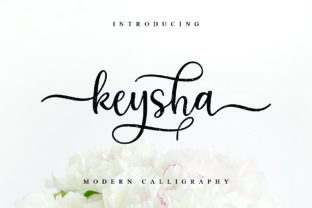
Keysha is a beautifully elegant script typeface — a Script Handwritten font designed for digital clarity and expressive impact. As a web designer who ships landing pages, SaaS dashboards, and boutique e-commerce sites, I reach for Keysha when I need a premium font that balances personality with precision. It’s not just decorative: its fresh, modern look translates cleanly across screens, supports visual hierarchy without sacrificing legibility, and reinforces brand tone in seconds — whether you’re designing a wellness coach’s homepage or a luxury candle shop’s product banner.
Keysha for Hero Section Headlines and Conversion-Focused Layouts
Keysha shines where attention matters most: hero section headlines on landing pages and high-intent conversion layouts. Its smooth, confident letterforms command focus without overwhelming — especially when paired with a clean sans serif like Inter or Manrope for body copy. Unlike overly ornate scripts, Keysha avoids visual noise; its open counters and balanced spacing ensure readability even at 48px on desktop and 36px on mobile. Use it for short, action-driven phrases — “Start Your Journey,” “Book Your Session,” “Limited Edition Drops” — and watch how it lifts perceived value while guiding the eye toward your primary CTA button.
Keysha for Boutique Online Stores and Branded Product Banners
For online stores selling handmade goods, artisanal skincare, or curated apparel, Keysha adds instant sophistication to banners, collection headers, and product name displays. As a Script Handwritten font, it conveys care, craft, and human touch — critical signals for shoppers evaluating trust and brand alignment. Apply Keysha sparingly: best used for category titles (“Hand-Poured Candles”), limited-edition labels (“Summer Edit”), or hero image overlays on Shopify or Webflow banners. Avoid using it for pricing or feature lists — reserve those for highly legible system or variable fonts. Always test contrast against background images: Keysha performs best over soft gradients, muted solids, or blurred photography — never busy textures or low-contrast overlays.
Keysha for Creative Portfolios and Designer-Led Brand Identities
If you're a UI designer, illustrator, or creative entrepreneur building a portfolio site or personal brand kit, Keysha acts as both voice and visual signature. Its modern elegance communicates professionalism without stiffness — ideal for “About Me” headers, project title cards, or testimonial accents. Because Keysha is a Fonts family built for versatility, it holds up across responsive breakpoints: scale it down to 28px for tablet-friendly section headings, or go bold at 64px for full-width hero treatments on desktop. Pair it with a neutral serif (like Cormorant Garamond) for editorial depth, or a geometric sans (like Poppins) for crisp, contemporary balance. Just remember: Keysha is a display font — not meant for paragraphs, navigation menus, or form fields.
Keysha for Blog Headers, Newsletter Titles, and Content Section Accents
Blog headers, email subject lines, and newsletter banners benefit from Keysha’s ability to signal tone before a single word is read. A food blogger using Keysha for “Sunday Supper Notes” or a SaaS founder styling “Product Updates” instantly sets an approachable, intentional mood. In CMS environments like Ghost or WordPress, embed Keysha as a webfont via @font-face or a licensed CDN — ensuring consistent rendering across devices. For accessibility, always pair it with sufficient line height (1.5+), generous letter spacing (0.5–1px), and minimum 24px sizing for standalone titles. Never use Keysha for clickable links or small CTAs — its fluid strokes reduce tap accuracy on mobile.
Keysha for Coaching Websites and Service-Based Landing Pages
Coaches, consultants, and course creators rely on typography to convey warmth, authority, and authenticity — and Keysha delivers all three. As a Script Handwritten font, it suggests empathy and individuality, helping visitors feel seen before they scroll past the fold. Try Keysha for headline variations like “Your First Step Starts Here” or “Clarity in 30 Days” — then anchor them with structured, accessible body text. On service pages, use it only for H1s and key subheads; avoid applying it to bullet points, pricing tables, or FAQ answers. For dark mode compatibility, test light-on-dark usage with subtle text shadows or increased weight — Keysha’s thin-to-medium stroke contrast adapts well when exported with OpenType features enabled.
Keysha for Digital Ad Creatives and Social Media Graphics
When designing static or animated ads for Instagram, LinkedIn, or Meta Ads Manager, Keysha adds memorable distinction without sacrificing scannability. Its modern rhythm works especially well for short-form hooks: “Yes, You Can Launch,” “This Changes Everything,” or “Join the Waitlist.” Export graphics at high resolution and verify legibility on thumbnail size — Keysha’s x-height and spacing hold up better than many script fonts at 18–24px. For animated banners, animate the reveal of Keysha text with subtle opacity or staggered letter transitions — never aggressive scaling or rotation, which disrupts its organic flow.
Keysha Font Licensing for Commercial Web Projects
Keysha is a commercial font — meaning it’s fully licensed for use in client websites, SaaS platforms, online stores, digital templates, and branded web assets. Before deploying, confirm your license includes webfont hosting (WOFF2/WOFF), unlimited pageviews, and redistribution rights if you’re selling Figma kits or Notion templates. Most reputable vendors provide multilingual support (Latin Extended-A), stylistic alternates, and cross-browser compatible files — check for OpenType features like ligatures and swashes if you plan to use Keysha for logo lockups or custom SVG text. Never self-host unlicensed webfonts or extract them from free font bundles — doing so risks legal exposure and inconsistent rendering.
Keysha Font Pairing Strategies for Clean, Professional Web Layouts
Pair Keysha thoughtfully — it’s strongest when contrasted, not crowded. For web design, combine it with a highly legible sans serif (Inter, Montserrat, or Space Grotesk) for body, buttons, and navigation. For editorial or luxury brands, try a refined serif (Lora, Playfair Display) for quotes or bylines. Avoid pairing Keysha with other scripts or decorative fonts — visual competition dilutes its elegance. In Figma or Adobe XD, set Keysha as your “display” layer and lock it to specific heading styles (H1, H2) to enforce consistency across design systems. And always preview your pairings in real browser conditions — not just mockups — to validate rhythm, hierarchy, and loading performance.